Key figures
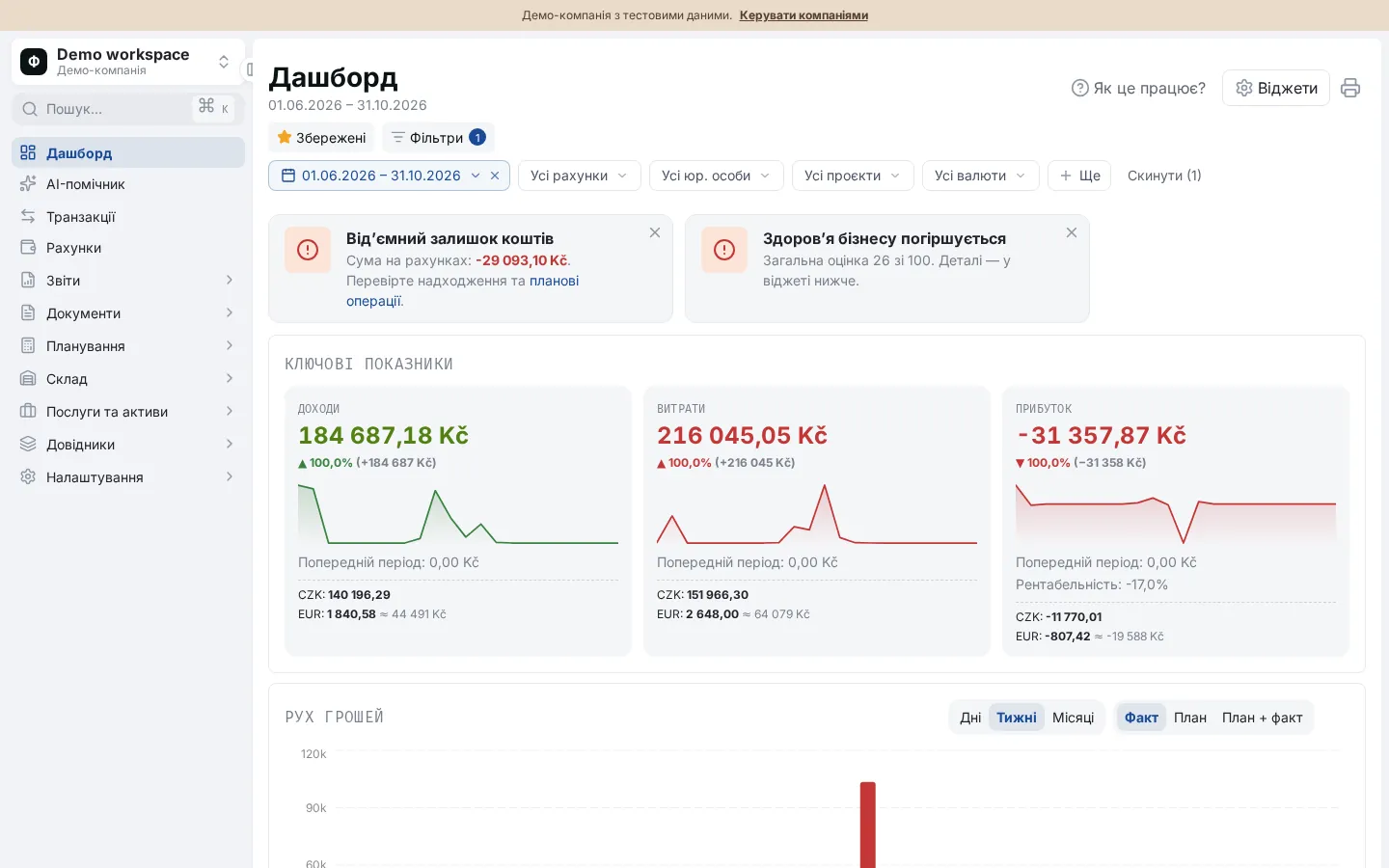
Income, expenses, profit and margin for the period, with change against the previous one, a mini chart and a per-currency breakdown.
One screen with the key numbers of the business and a simple 0–100 score of its condition, with explanations and advice.
The Financist dashboard puts income, expenses, profit, cash movement, account balances and upcoming payments on one screen. The Business Health widget scores the business from 0 to 100 on five indicators: profit margin, liquidity, runway, revenue growth and debt load, with plain-language explanations and advice.
The dashboard is the main screen with the key numbers for the chosen period: income, expenses, profit and how they changed compared with the previous period. Business Health is a dashboard widget that combines five financial indicators into one score from 0 to 100 and explains each in plain language: what is happening and what to do. For the thinking behind such indicators, read the guide to business health metrics.
The score needs transaction history of at least 3 months before the end of the period; until there is enough data, the widget shows the "Forming" status. The score is calculated for the whole business and does not depend on dashboard filters except the period.
Benchmarks and weights are defaults and can be changed.
| Indicator | Question it answers | How it is calculated | Weight / benchmark |
|---|---|---|---|
| Net profit margin | What share of income is left as profit? | (income − expenses) / income for the period | 30 / 17% |
| Liquidity | Is there enough cash to cover unpaid commitments? | Cash / unpaid commitments; with no commitments the value is unlimited | 20 / 1.5 |
| Runway | How many months will cash last if expenses keep exceeding income? | Cash / average monthly deficit (expenses minus income); with no deficit the runway is unlimited | 25 / 3 months |
| Revenue growth | Is income growing? | Change in income against the previous period of the same length | 10 / 10% |
| Debt load | How dependent is the business on debt? | Debt / equity, where equity = cash + receivables − debt | 15 / no more than 1 |
Income, expenses, profit and margin for the period, with change against the previous one, a mini chart and a per-currency breakdown.
A chart of cash movement by day, week or month (actual, plan or both) and a widget with account balances.
Breakdown by category, category dynamics, period comparison, top counterparties, suppliers and projects, least profitable projects and segment profitability.
Warning cards for negative cash, overdue planned payments and declining business health.
Of 13 widgets, each user turns the needed ones on, hides the rest and reorders them; the setup is saved for that user.
In the "Drivers" dialog you can change indicator weights, score scales and the texts of explanations and advice, if you have the right.
The overall score is the average of the five indicator scores, weighted by their weights. Based on the score, the business gets one of four statuses: "Declining", "Needs attention", "Growing" or "Booming". For each indicator you also see its score, actual value, level and advice.
For example, the indicator scores are: margin 80, liquidity 60, runway 100, growth 35, debt 100. With weights 30, 20, 25, 10 and 15, the overall score is (80×30 + 60×20 + 100×25 + 35×10 + 100×15) / 100 = 79.5 out of 100.
The dashboard helps an owner who wants to see the state of affairs in a minute, and a manager who watches cash every day. It answers: are we earning, do we have enough cash, are we growing, are we too dependent on debt. For details see the cash flow statement and the payment calendar; you can also ask questions about your data to the AI assistant.
It needs transaction history of at least 3 months before the end of the chosen period. With less data the widget shows the "Forming" status and a hint to keep entering transactions. Some indicators, such as debt load, also need commitments to be recorded.
Of all filters, the score uses only the period. Accounts, projects, counterparties and other filters affect the other widgets, but not Business Health, which assesses the business as a whole.
Yes. In the "Drivers" dialog you set indicator weights, the scale that converts a value into a score, the benchmark, and the explanations with advice. You can create your own indicators and duplicate standard ones. Changes require the right to manage indicators or settings.
"Declining" means weak financial indicators and a need for urgent action. "Needs attention" means some indicators have slipped. "Growing" means a good state with room to improve. "Booming" means high indicators. "Forming" means there is not yet enough data for a score.
Yes. The "Widgets" button opens a list of 13 widgets: each can be turned on or off, and the order is changed with arrows. The setup is saved separately for each user, and a single widget can be hidden with the button on it.