Cash flow
A cash flow report by category, account, counterparty or project; actual and planned; by day, week, month, quarter or year.
All your money, reports and an AI assistant in one place: from accounts and transactions to cash flow, profit and loss, and the balance sheet.
Financist is a management accounting system for small and mid-sized businesses. It brings accounts and transactions into one place and builds cash flow, profit and loss, balance sheet, debts and payment calendar reports from them. It includes an AI assistant. The product is in early access and can be tried on demo data.
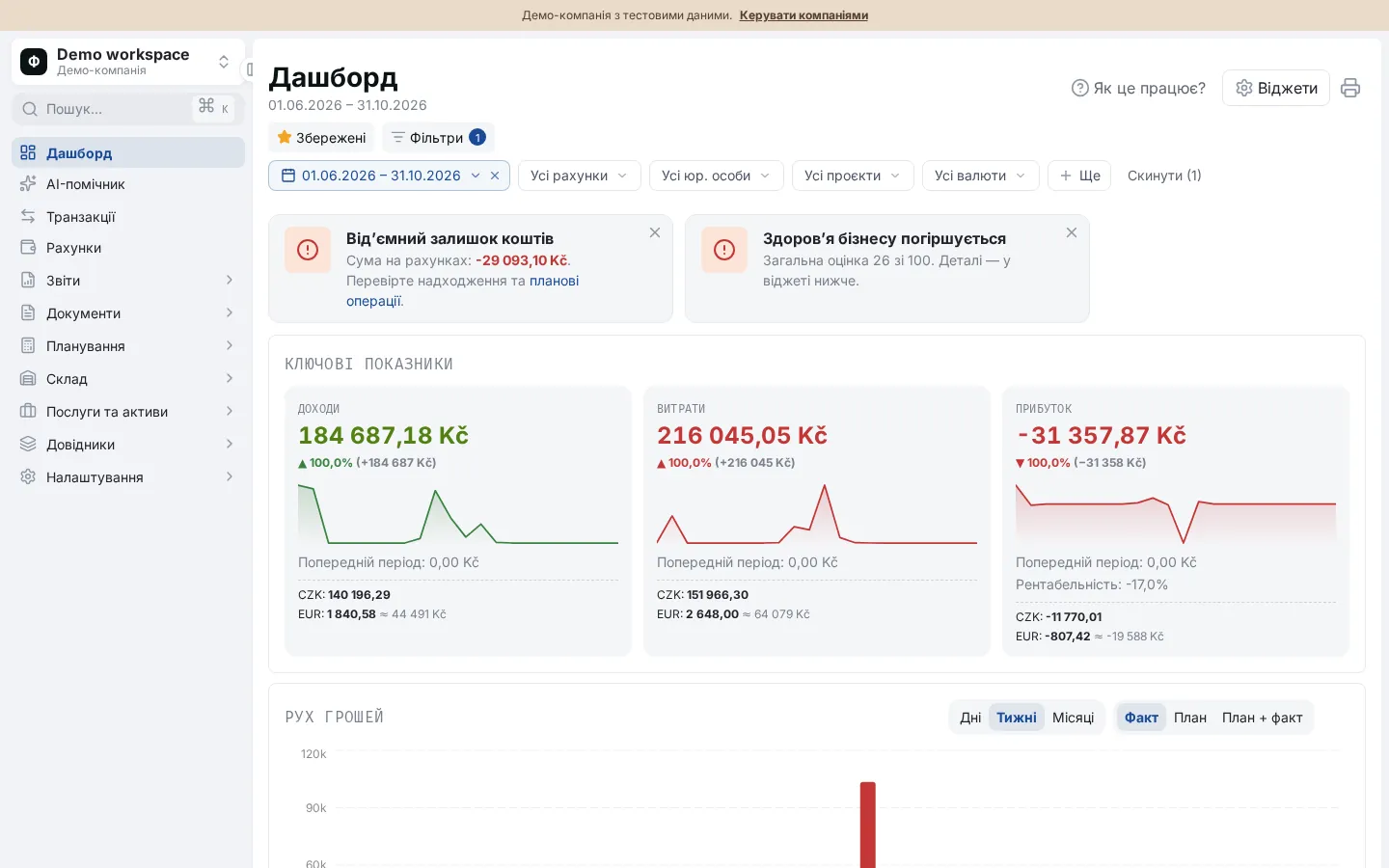
Financist is a web service for management accounting. It shows how much money the business has, where it comes from, where it goes, and what is likely to happen to it over the coming weeks.
Unlike bookkeeping software, Financist is not meant for filing tax returns. Its job is to give owners and finance people a clear picture for decisions: accounts, transactions, income and expense categories, projects, counterparties, debts and budgets.
The service is built by Swipe Scape s.r.o. It is currently in early access.
Everything for day-to-day management accounting runs on one set of data.
A cash flow report by category, account, counterparty or project; actual and planned; by day, week, month, quarter or year.
A profit and loss statement on an accrual or cash basis, and a balance sheet for any date, from the same transactions.
Income, expenses, profit, cash dynamics and a business health score based on five indicators: margin, liquidity, runway, revenue growth and debt pressure.
A day-by-day balance forecast, cash gaps, overdue payments, receivables and payables with ageing.
Invoices, acts, waybills and contracts, payments linked to documents, and payment requests with approval chains.
Ask about your money in plain language. Changes to your books happen only after you confirm. Import statements through a connection to Claude.
Three steps from the first visit to your first reports.
In the app, click the demo button (“Спробувати демо з даними”; the app interface is currently in Ukrainian). A temporary workspace with sample accounts and transactions is created. No sign-up is needed.
Create accounts, enter transactions, import a CSV statement, or ask Claude to import a statement through the connection. Imports show a preview before anything is saved.
The dashboard, cash flow, profit and loss, balance sheet, debts and payment calendar update from your transactions. Any figure can be drilled down to the transactions behind it.
It suits teams that need transparent accounting without a dedicated finance department.
Income and expenses by property and business line, supplier debts, and a cash forecast for the season. The service grew out of the books of a real glamping site.
For owners without a finance department: money, debts and profit on one dashboard, with role-based access for the team.
Several companies in separate workspaces, roles for clients and colleagues, and data export.
Excel and Google Sheets are a fine place to start. Here is where Financist works differently.
| What matters | Excel or Google Sheets | Financist |
|---|---|---|
| Reports | You build formulas and pivot tables yourself | Five reports are built from transactions automatically |
| Statement import | Copy and paste, then check for duplicates by hand | Import through Claude with a preview, duplicate detection and an undo window of 7 days |
| Access rights | Access to a whole file or sheet | Roles with 45 separate permissions; an employee sees only the accounts assigned to them |
| Plan vs actual | Separate sheets reconciled manually | Planned and actual transactions in one system, plus budgets with execution tracking |
| Payment approvals | Email threads and chat messages | Payment requests with approval chains and a decision history |
| Activity log | File version history | An audit log of access and settings changes |
| Flexibility | Any structure, maximum freedom | The structure is defined: accounts, categories, projects, counterparties. Less freedom, more consistency |
Financial data is sensitive, so we describe only what can be verified:
Details, and an honest list of what the service does not do yet, are on the Security page.
Financist is a management accounting web service for small and mid-sized businesses. It collects accounts, transactions, debts and budgets, builds cash flow, profit and loss, balance sheet and payment calendar reports, and includes an AI assistant for questions about your own data.
Yes. The app has a demo button. It creates a temporary workspace with sample accounts and transactions so you can explore the dashboard and reports. The demo is for evaluation, not for your working data.
Pricing has not been announced yet: the service is in early access. The demo is available now, and terms for using your own data are agreed on request. See the Pricing page for details.
No. Financist is management accounting, built to support decisions by owners and finance people. It is not meant for filing tax returns or statutory reports, so it is best used alongside your accountant or bookkeeping software.
You can import a CSV file, or connect Claude and ask it to import a statement: it extracts the rows and Financist shows a preview that flags duplicates. There is no automatic bank synchronisation at the moment.
Data is stored on servers in the EU (Germany). Each workspace is isolated from the others and access is controlled by roles. See the Security page for more.