Five groupings
Group cash movements by category, account, counterparty, project or direction, and look at the same money from different angles.
See where money came from and where it went: by category, account, project or counterparty, by day, week, month, quarter or year.
The cash flow statement in Financist shows every inflow and outflow for a period, with opening and closing balances. You can group it by category, account, counterparty, project or business direction, and view actuals, plan, or plan together with actuals. It suits owners and managers of small businesses who care about real cash.
A cash flow statement shows how much money reached your accounts and how much left them during a period, and how the balance changed as a result. A transaction lands in it on the day it is actually paid, not on the day of the sale or the invoice. That is why it answers "why do I have less cash than I expected?", which a profit and loss statement cannot. For the full comparison, read the guide to the cash flow statement.
All amounts are converted to the workspace base currency.
Group cash movements by category, account, counterparty, project or direction, and look at the same money from different angles.
Period columns by day, week, month, quarter or year. You set the date range yourself, or take all time.
The Actual / Plan / Plan + actual switch shows future planned receipts and payments next to what has already happened.
Accounts, legal entities, projects, directions, counterparties, tags and a text search narrow the report to what you need.
Click an amount to open the transactions behind it, with the same period and filters.
Switch charts on or off, download the report as CSV for Excel, or print it.
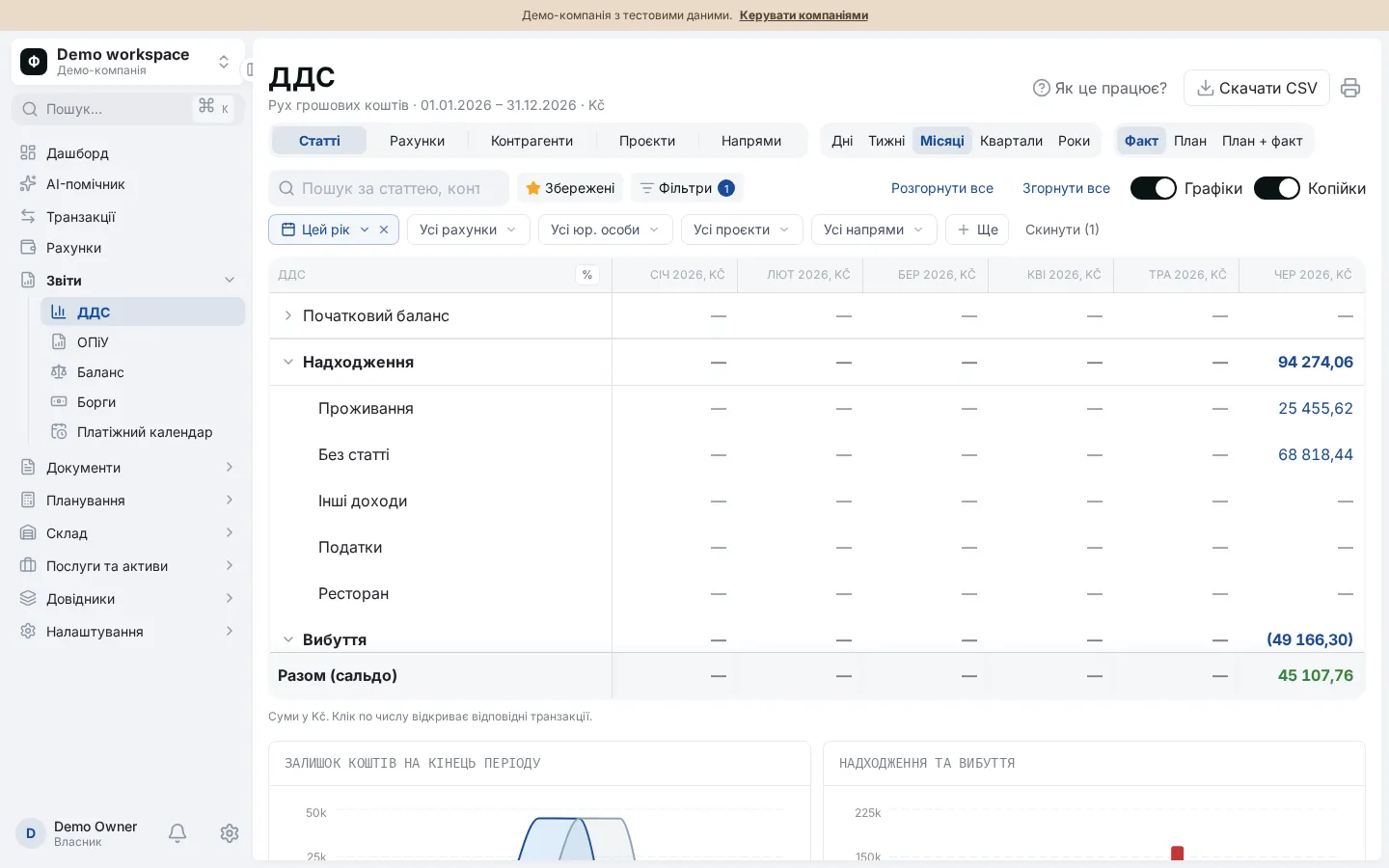
For example, the current year by month, or the last quarter by week.
Categories show what the money is spent on, accounts show where it sits, projects and counterparties show who brings it in and who takes it out.
Turn on "Plan + actual" to see future planned operations and recurring payments next to actuals.
Click a suspicious amount to open its transactions. Download a CSV if you need to share it.
The report helps owners who want to understand where the money goes, managers who are responsible for payments, and accountants who need to explain cash movements quickly. It answers questions such as:
For example, in a month 12,000 EUR came in and 9,500 EUR went out. Net cash flow is +2,500 EUR. If the month opened at 4,000 EUR, it closes at 6,500 EUR. For a day-by-day outlook, use the payment calendar.
The cash flow statement counts money when it is paid: what reached your accounts and what left them. The profit and loss statement shows how much the business earned and, under the accrual method, assigns income and expenses to the period they belong to, even if no cash has moved yet. That is why you can show a profit and still run out of cash.
Yes. The switch in the cash flow report has Actual, Plan and Plan + actual modes. The plan is built from planned operations that are not yet completed, including recurring payments. You see how cash movement will change if every planned payment and receipt really happens.
In the workspace base currency. Accounts in other currencies are converted at exchange rates, and the effect of rate changes between the start and the end of the period is shown on a separate currency revaluation row. There are no separate columns per currency at the moment.
Yes. You can download the report as a CSV file that opens in Excel, and you can print it. The file follows the grouping, period and filters selected on screen.
Users whose role grants the right to view the balance or the dashboard. The report also respects account access: a user sees only the accounts that have been opened to them.